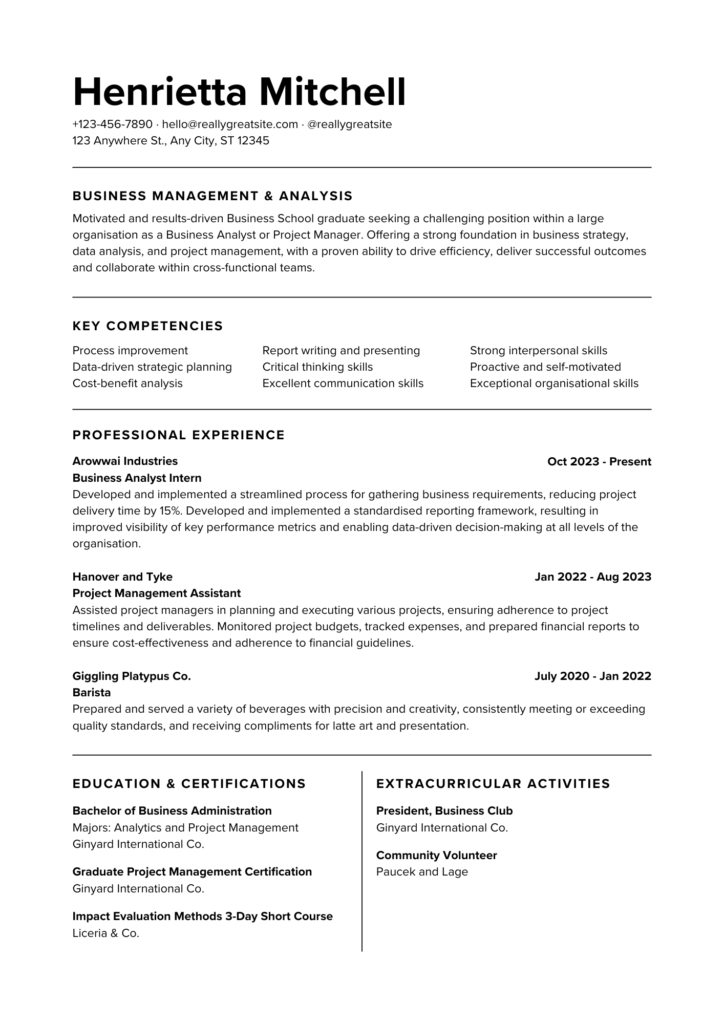
In today’s competitive job market, a well-crafted resume is crucial to standing out from the crowd. With the rise of applicant tracking systems (ATS) and remote work, it’s essential to create a resume that not only showcases your skills and experience but also passes the ATS test.
Step 1: Gather Your Professional Information
Before starting to write your resume, gather all the necessary information, including:
- Impressive measurable accomplishments from your previous positions
- A complete inventory of your soft skills, hard skills, and technical skills
- Detailed information about your previous employers, including their names, dates of employment, locations, job titles, and a clear outline of your responsibilities
- Educational credentials, such as your college degree, certifications, or licenses
- Any volunteer work where you gained skills and experience relevant to the role you are applying for
- Notable awards and honors you have received
Step 2: Choose the Best Resume Format for Your Needs
There are three standard resume formats: chronological, functional, and combination. Choose the one that best showcases your skills and experience.
- Chronological resume format: perfect for candidates with consistent work experience
- Functional resume format: ideal for those with gaps in employment or limited work experience
- Combination resume format: combines the best of both chronological and functional formats
Step 3: Add Your Contact Information
Include the following contact information:
- Full name
- Reliable phone number
- Professional email address
- City, state, and ZIP code
- Link to your professional social media account, website, or portfolio (if applicable)
Step 4: Write a Compelling Resume Summary
A resume summary is a concise overview of your qualifications, skills, and career goals. It should:
- Highlight your most valuable skills and accomplishments
- Entice the reader to explore your resume further
- Avoid generic clichés and focus on what sets you apart from other applicants
Step 5: Make a Resume Work History Section
When creating a work history section:
- Display three to five work accomplishments in bullet points
- Quantify your achievements whenever possible
- Format this section by listing jobs in reverse-chronological order
Step 6: Create a Skills Section to Highlight Your Strengths
Include a mix of hard skills and soft skills that match the job description. Use our AI resume skills generator tool to get started.
Step 7: List Your Education Credentials
Include the following information:
- University or high school name
- Location
- Date of graduation (or expected graduation date)
- Degree or certification earned
Step 8: Add Relevant Certifications, Licenses, and Training
Create a separate section for certifications, licenses, or professional training. Include:
- Title of the certification, course, or license
- Name of the certifying agency or body
- Date earned (or expected completion date)
Step 9: Proofread and Save Your Final Product
- Use our Resume Builder and professionally designed templates to create a resume in minutes
- Proofread your resume thoroughly to ensure error-free formatting and content
- Save your resume as a PDF or DOCX file
Step 10: Include Optional Resume Sections
Consider adding optional sections, such as:
- Volunteer work
- Awards and honors
- Publications
- Relevant hobbies or interests
Create Your Dream Resume Today!
Are you struggling to create a resume that showcases your skills and experience? Look no further! Our partner resume builder offers a range of tools and templates to help you create a professional-looking resume in minutes.
Key Features:
- Easy to Use: Simple and intuitive interface makes it easy to create a resume, even if you have no experience.
- Customizable Templates: Choose from a range of modern and professional templates to match your personal brand.
- Expert Guidance: Get tips and advice from career experts to help you showcase your skills and experience.
- Downloadable: Download your resume in a range of formats, including PDF, Word, and Text.
By using our partner resume builder, you’ll be able to create a high-quality resume that will help you stand out from the competition and land your dream job.
Good Luck!
We hope you find this resource helpful in your job search. Good luck with your applications!